
Replies: 20 comments 3 replies

-
|
I'm not a developer of any of the modernized agents but here is my understanding of things - perhaps it will help illustrate why its not a good idea what you are suggesting.... the PLEX agent is agnostic to any functionality other than reading file names for the purpose of matching the content to be displayed in PLEX libraries. File dependencies exist outside of PLEX; i.e. operating system characteristics unique to file/directory structure, torrent file structure, meta search software, sharing with other content systems (i.e. Kodi) in the eco-system, etc.. Take for example torrenting: a torrent file is active within a torrent client, that torrent is already dictating file placement and location of the content with one's organizational structure on their specific operating system. One has to manage the torrent file, the file name of the content within the torrent, placement location of said content within, and keeping the torrent active within the client. The torrent file, with a dependency to operating system file structure, and its own structure within that (i.e. Windows 11 o/s, D:\Drive Dedicated Content Library Folder Structure, is maintained by Torrent Client and Torrent file placement/naming/management, is read by search engines, PLEX Library placement, PLEX agents reading content). In that chain, PLEX agent is last - because of the dependencies that must come before it, and what you propose is actually related to dependencies that must be managed prior to matching content for display within a PLEX library. The expression "tail wags the dog" illustrates the dependency of the PLEX agent being able to match content based upon file name is already something that has to be reverse-engineered in relation to file content placement and arrangement. Hence the user guide illustrates that there are only a few true organizational approaches to consider for file management/placement: Adult Feature Films, Adult Scenes or third option being just Adult (and there are considerations in preparation for each). IF the PLEX agent began moving file content and changing placement it could break other dependencies which already exist (as in the case of the torrent client expects the data to be located where it had placed it already). That leaves us where we are - you have to do so manually (as you have been) or thru the use of scripts (customized to your unique operating system file structure and your chosen organizational structure). If you are like most of us; you have a LOT of content that you have to manage, its painstaking and time-consuming. One of our members goes so far as to alter each file's existing meta properties and embed all of the content necessary to have the same end-result as PLEX agent matching, without using the agent (in essence, like an NFO file that can be embedded within a folder - but in this case actually embedded within the actual content file) - and THAT IS exhausting commitment! It's been some time since I used Kodi, but at one iteration of my efforts to manage my content eco-system, I was handshaking PLEX with Kodi to perform an export/import situation to create and embed NFO files. I believe the functionality still exists but many of the scripts/agents written for meta content matching of gay content has been neglected for some time by their developers. Maybe there is something there that can come close to what you are wanting to achieve, you'd have to do the research and testing. |
Beta Was this translation helpful? Give feedback.

-
|
Maybe I didn't explain it well. I don't intend to mess with the way that Plex works or the agents used to collect the metadata or anything like that. What I'm looking for is something, be it an application or a script, as you say, that, apart from and prior to making the video file available in the folder that will be analyzed by Plex and the agent in question (either AEBN, GEVI or any other), allows you to create automatically an organized folder structure, based on parts of the video filename that we had to assign so that the agent finds the desired information. Since the name of the file must follow the standard "(studio) - filmname (year)" so that the agent can detect it in the site and collect the metadata, if there was a tool or script that works in a windows environment, that takes the "(studio)" part and create a "studio" folder and then take the "filmname (year)" part and create inside the previous "studio" folder a new folder "filmname (year)" and then move the file inside, it would made life a lot easier. According to Plex rules, the application itself advises that video files, being regular movies or not, must be inside folders with the same name as the file in question. I apologize if I didn't explain myself well, I don't intend to change the agents or the way Plex works, just find something that facilitates the external organization of the content, nothing else. I raised this discussion here because there may be other people in the same situation or perhaps someone who has managed to solve it, or something similar. We can always learn from each other. |
Beta Was this translation helpful? Give feedback.

-
|
Yes there is.
Using vbscript..
1. You iterate through your files...
2. Get filename
3. Split on dash leaving you studio and title (year)
4. Create folder studio if it does not exist and create title_year folder
under that.
5. Then move file into that subfolder..
…On Wed, 25 May 2022, 22:07 joca879, ***@***.***> wrote:
Maybe I didn't explain it well.
I don't intend to mess with the way that Plex works or the agents used to
collect the metadata or anything like that.
What I'm looking for is something, be it an application or a script, as
you say, that, apart from and prior to making the video file available in
the folder that will be analyzed by Plex and the agent in question (either
AEBN, GEVI or any other), allows you to create automatically an organized
folder structure, based on parts of the video filename that we had to
assign so that the agent finds the desired information.
Since the name of the file must follow the standard "(studio) - filmname
(year)" so that the agent can detect it in the site and collect the
metadata, if there was a tool or script that works in a windows
environment, that takes the "(studio)" part and create a "studio" folder
and then take the "filmname (year)" part and create inside the previous
"studio" folder a new folder "filmname (year)" and then move the file
inside, it would made life a lot easier.
According to Plex rules, the application itself advises that video files,
being regular movies or not, must be inside folders with the same name as
the file in question.
I apologize if I didn't explain myself well, I don't intend to change the
agents or the way Plex works, just find something that facilitates the
external organization of the content, nothing else.
I raised this discussion here because there may be other people in the
same situation or perhaps someone who has managed to solve it, or something
similar. We can always learn from each other.
—
Reply to this email directly, view it on GitHub
<#170 (comment)>,
or unsubscribe
<https://github.com/notifications/unsubscribe-auth/AKI3AKLWIZNL3N52JDF7IZDVL2B6RANCNFSM5W5UMZBQ>
.
You are receiving this because you are subscribed to this thread.Message
ID: <CodyBerenson/PGMA-Modernized/repo-discussions/170/comments/2822873@
github.com>
|
Beta Was this translation helpful? Give feedback.
-
|
Thanks for indication @JPH71 . |
Beta Was this translation helpful? Give feedback.
-
|
If I have some time, I will write a script and we can then think of having
some utilities added to our repository.
I am assuming you are on a windows installation.....
Jason xxx
…On Thu, 26 May 2022 at 10:33, joca879 ***@***.***> wrote:
Thanks for indication @JPH71 <https://github.com/JPH71> .
I will research the theme to see if I can implement something like this
and achieve what I want.
Thanks again
—
Reply to this email directly, view it on GitHub
<#170 (comment)>,
or unsubscribe
<https://github.com/notifications/unsubscribe-auth/AKI3AKLUJP5CEIA45L6J7C3VL4ZNJANCNFSM5W5UMZBQ>
.
You are receiving this because you were mentioned.Message ID:
***@***.***
.com>
|
Beta Was this translation helpful? Give feedback.
-
|
It would be great @JPH71. Unlike you, my computer skills, apart from normal usage, are meager. I don't know what others may think, but maybe it would be a good utilitie. Initially I had all the files in a single folder and started having some errors when I needed to get the metadata of some movies, especially when I had to change to other agent in the settings of the agents. Hence my intention to put each movie in its own folder, because that way, from what I understand, Plex will only analyze the change in that folder and not all the files... I thought creating a folder per studio and then creating the folders of each film inside the corresponding studio folder, it would be a good organization and it would allow quicker future searches in windows or mac environment, because knowing which studio, you just have to go to its folder and then find the folder of the movie in question... But in fact, doing that job manually for hundreds or thousands of files, it takes a lot of time. So I thought, if we could take advantage of the filename that we have to assign for the agents to look for the metadata, since it has the name of the studio and the name of the movie and its year. I'm mostly a Windows user, but I also use Mac sometimes. Thanks |
Beta Was this translation helpful? Give feedback.
-
|
The code I am using will work on a Windows platform natively
I tend to have all my movies stored in huge folders... if a studio has over
100 movies it gets its own folder
Film specific folders are created for those that have extra scenes etc...
It would be better in .y view to have a studio folder... but instead of
having a title folder, I would have it as studio + title year... under each
…On Thu, 26 May 2022, 11:25 joca879, ***@***.***> wrote:
It would be great @JPH71 <https://github.com/JPH71>. Unlike you, my
computer skills, apart from normal usage, are meager.
I don't know what others may think, but maybe it would be a good utilitie.
Initially I had all the files in a single folder and started having some
errors when I needed to get the metadata of some movies, especially when I
had to change to other agent in the settings of the agents. Hence my
intention to put each movie in its own folder, because that way, from what
I understand, Plex will only analyze the change in that folder and not all
the files...
I thought creating a folder per studio and then creating the folders of
each film inside the corresponding studio folder, it would be a good
organization and it would allow quicker future searches in windows or mac
environment, because knowing which studio, you just have to go to its
folder and then find the folder of the movie in question...
But in fact, doing that job manually for hundreds or thousands of files,
it takes a lot of time.
So I thought, if we could take advantage of the filename that we have to
assign for the agents to look for the metadata, since it has the name of
the studio and the name of the movie and its year.
I'm mostly a Windows user, but I also use Mac sometimes.
Thanks
—
Reply to this email directly, view it on GitHub
<#170 (comment)>,
or unsubscribe
<https://github.com/notifications/unsubscribe-auth/AKI3AKM5PKPEZVTINEKJBPLVL47RPANCNFSM5W5UMZBQ>
.
You are receiving this because you were mentioned.Message ID:
***@***.***
.com>
|
Beta Was this translation helpful? Give feedback.
-
|
Maybe it's a possible approach. Have you ever had problems getting metadata from agents? In the agents settings, do you have all the agents selected from the start or just the one you use to obtain the information? The problems I had was when I had all the movies inside a single folder and I had only AEBN agent selected in the options. Since some of them were not in AEBN, I had to go to the settings and choose another agent, GEVI or GayDVDEmpire and then update the metadata... And that's when some movie data disappeared, and in some previously created collections there were missing movies. After the fact, I went to look carefully at the PLEX instructions and then I saw their advise that the file of each movie should be inside a folder with the same name. I deleted my library, cleaned up all metadata and plugins and and start loading everything again. If you've never had problems with getting data and losing previously retrieved data, then possibly something is wrong in my setup. |
Beta Was this translation helpful? Give feedback.
-
|
When I set up a new library, I tend to use gevi as my first scraper as it
is the most robust, filled by aebn, gaydvdempire, and gayhotmovies...
After the first scrap arrange your movies by year... all the unscripted
ones will be at the end... for these I use the next three that I
mentioned.. repeat the procedure and use the unchecked agents..
I have lost all my metadata a number if times without doing anything...
good thing is that you end up using the latest agent version...
…On Thu, 26 May 2022, 15:02 joca879, ***@***.***> wrote:
Maybe it's a possible approach.
Have you ever had problems getting metadata from agents? In the agents
settings, do you have all the agents selected from the start or just the
one you use to obtain the information?
The problems I had was when I had all the movies inside a single folder
and I had only AEBN agent selected in the options. Since some of them were
not in AEBN, I had to go to the settings and choose another agent, GEVI or
GayDVDEmpire and then update the metadata... And that's when some movie
data disappeared, and in some previously created collections there were
missing movies.
After the fact, I went to look carefully at the PLEX instructions and then
I saw their advise that the file of each movie should be inside a folder
with the same name.
I deleted my library, cleaned up all metadata and plugins and and start
loading everything again.
If you've never had problems with getting data and losing previously
retrieved data, then possibly something is wrong in my setup.
—
Reply to this email directly, view it on GitHub
<#170 (comment)>,
or unsubscribe
<https://github.com/notifications/unsubscribe-auth/AKI3AKK3DIXW5USDQIWFXPTVL5Y6VANCNFSM5W5UMZBQ>
.
You are receiving this because you were mentioned.Message ID:
***@***.***
.com>
|
Beta Was this translation helpful? Give feedback.
-
|
It seems to me that you perform the same procedure as me. The difference is in the 1st agent, I use aebn. Only when the movie is not found in it, I go to the settings, deselect aebn and select gevi or gaydvdempire to make a new match. Is there any advantage to having all 4 agents selected at the same time, or is it better to have only 1 agent selected at a time? I don't know if you saw my later reference in #169, regarding changes to collections. Imagine that you have the studio collection enabled, you searched for a bunch of films and later you also want the director's collection... if you then select the option to do so on the agents settings and update the metadata, was it not expected that the new collection would be obtained? I've tried something similar a while back and it didn't create the collection. I only managed to get it after deleting the library and creating a new one again, with all the desired collections selected in the settings... i.e., you cannot make subsequent changes to the collections, because the system will not recognize it |
Beta Was this translation helpful? Give feedback.
-
|
Here is the script - copy all the code between the **** lines into notepad
and save as PlexifyFolder .vbs.
It will create sub-folders named after the STUDIO under the folder you
select, then move the film into it.
The end result will be a collection of studio folders
If all files follow (Studio) - Tile (Year)... you should have no files in
the browsed to folder...
******
Option Explicit
Const DRIVES = &H0011 ' My Computer
Const BIF_RETURNONLYFSDIRS = &H0001 ' only file system folders can be
selected
Const BIF_NONEWFOLDERBUTTON = &H0200 ' hide make new folder button
Dim arrstrFileName
Dim colFiles
Dim objBrowsedFolder, objFile, objFolder, objFSO, objShell
Dim strFolder, strStudio, strStudioFolder
Set objShell = CreateObject("Shell.Application")
Set objFSO = CreateObject("Scripting.FileSystemObject")
' Create a dialog object
Set objBrowsedFolder = objShell.BrowseForFolder( 0, "Select Film Folder",
BIF_RETURNONLYFSDIRS + BIF_NONEWFOLDERBUTTON, DRIVES) ' start at drives in
computer
If objBrowsedFolder is Nothing Then WScript.Quit
strFolder = objBrowsedFolder.Self.Path
' pattern for matching films (Studio) - Title (Year)
Set objFolder = objFSO.GetFolder(strFolder)
Set colFiles = objFolder.Files
For Each objFile in colFiles
If InStr(objFile.Name, " - ") > 0 Then
arrstrFileName = Split(objFile.Name, " - ") ' split filename into studio
and title, year + etc
strStudio = Trim(arrstrFileName(0)) ' studio is should be first split
enclosed in brackets - skip if not
If Left(strStudio, 1) = "(" And Right(strStudio, 1) = ")" Then
strStudio = Replace(strStudio, "(", "")
strStudio = Replace(strStudio, ")", "")
strStudio = Trim(Split(strStudio, ";")(0)) ' drop iafd studio, this comes
after a semi-colon ;
' create Studio folder in selected folder
strStudioFolder = strFolder & "\" & strStudio
If Not objFSO.FolderExists(strStudioFolder) Then objFSO.CreateFolder
strStudioFolder
'Move file to Studio folder if not present in studio folder
If Not objFSO.FileExists(strStudioFolder & "\" & objFile.Name) Then
objFSO.MoveFile objFile.Path, strStudioFolder & "\"
End If
End If
Next
******
…On Thu, 26 May 2022 at 21:02, Jason Hudson ***@***.***> wrote:
Yes we seem to use the same procedure...
I also used aebn as my premier until Cody introduced me to gevi...
And now that GEVI also sorts out its genres from aebn, gaydvdempire and
gayhotmovies.. its definitely at the top..
In regards to collections what you say should be the default behavior. I
will also look into this and check out the code...
On Thu, 26 May 2022, 16:21 joca879, ***@***.***> wrote:
> It seems to me that you perform the same procedure as me.
>
> The difference is in the 1st agent, I use aebn. Only when the movie is
> not found in it, I go to the settings, deselect aebn and select gevi or
> gaydvdempire to make a new match.
>
> Is there any advantage to having all 4 agents selected at the same time,
> or is it better to have only 1 agent selected at a time?
>
> I don't know if you saw my later reference in #169
> <#169>, regarding
> changes to collections. Imagine that you have the studio collection
> enabled, you searched for a bunch of films and later you also want the
> director's collection... if you then select the option to do so on the
> agents settings and update the metadata, was it not expected that the new
> collection would be obtained? I've tried something similar a while back and
> it didn't create the collection. I only managed to get it after deleting
> the library and creating a new one again, with all the desired collections
> selected in the settings... i.e., you cannot make subsequent changes to the
> collections, because the system will not recognize it
>
> —
> Reply to this email directly, view it on GitHub
> <#170 (comment)>,
> or unsubscribe
> <https://github.com/notifications/unsubscribe-auth/AKI3AKPOHGQQVCN3JYNU2HDVL6CGXANCNFSM5W5UMZBQ>
> .
> You are receiving this because you were mentioned.Message ID:
> <CodyBerenson/PGMA-Modernized/repo-discussions/170/comments/2828002@
> github.com>
>
|
Beta Was this translation helpful? Give feedback.

-
|
Thanks @JPH71 You're awseome! I could never create something like that. As soon as I have time I will try the script and then I'll tell you how it went. It will make my life a lot easier. Thanks again |
Beta Was this translation helpful? Give feedback.
-
|
@joca879 - you are very welcome - place the script on your desktop and when
it runs you can select any folder that has the movies in....
…On Sun, 29 May 2022 at 16:47, joca879 ***@***.***> wrote:
Thanks @JPH71 <https://github.com/JPH71>
You're awseome!
I could never create something like that.
As soon as I have time I will try the script and then I'll tell you how it
went.
It will make my life a lot easier. Thanks again
—
Reply to this email directly, view it on GitHub
<#170 (reply in thread)>,
or unsubscribe
<https://github.com/notifications/unsubscribe-auth/AKI3AKL5IALBXM66LHNB53TVMN7PNANCNFSM5W5UMZBQ>
.
You are receiving this because you were mentioned.Message ID:
***@***.***
.com>
|
Beta Was this translation helpful? Give feedback.
-
|
I've tried... Maybe I did something wrong, but I didn't get the subfolders created, only the studio folders. I've tried with this sample of files: It creates the folders studios for Titan Media, Alphamales Studio and Lucas Kazan Productions, and move the files inside each one, but it did not create de subfolders with the naming of the movie, like for example Breakers (2008) inside the Titan Media folder studio, and neither move the movie file inside... What am I doing wrong? |
Beta Was this translation helpful? Give feedback.
-
|
For the Following
Alphamales Studio) - Fit As Fuck - Pedro And Daniel Fuckfest (2008)
(Lucas Kazan Productions) - Decameron - Two Naughty Tales (2004)
(Titan Media) - Breakers (2008) - pt1
(Titan Media) - Breakers (2008) - pt2
You should get 3 Subfolders named with the following files within each
subfolder
*Alphamales Studio*
(Alphamales Studio) - Fit As Fuck - Pedro And Daniel Fuckfest (2008)
*Lucas Kazan*
(Lucas Kazan Productions) - Decameron - Two Naughty Tales (2004)
*Titan Media*
(Titan Media) - Breakers (2008) - pt1
(Titan Media) - Breakers (2008) - pt2
Remember that if you took the Studio name of the filename the Gay Film
agent will not scrape as the filename will not have the pattern (studio) -
Title (Year)
So for example : Fit as Fuck - Pedron And Daniel fuckfest (2008) will not
match as the studio is missing...
…On Sun, 29 May 2022 at 17:20, joca879 ***@***.***> wrote:
@JPH71 <https://github.com/JPH71>
I've tried... Maybe I did something wrong, but I didn't get the subfolders
created, only the studio folders.
I've tried with this sample of files:
(Alphamales Studio) - Fit As Fuck - Pedro And Daniel Fuckfest (2008)
(Lucas Kazan Productions) - Decameron - Two Naughty Tales (2004)
(Titan Media) - Breakers (2008) - pt1
(Titan Media) - Breakers (2008) - pt2
It creates the folders studios for Titan Media, Alphamales Studio and
Lucas Kazan Productions, and move the files inside each one, but it did not
create de subfolders with the naming of the movie, like for example
Breakers (2008) inside the Titan Media folder studio, and neither move the
movie file inside...
What am I doing wrong?
—
Reply to this email directly, view it on GitHub
<#170 (comment)>,
or unsubscribe
<https://github.com/notifications/unsubscribe-auth/AKI3AKL6I3CU3EL5WPADSNLVMODNTANCNFSM5W5UMZBQ>
.
You are receiving this because you were mentioned.Message ID:
***@***.***
.com>
|
Beta Was this translation helpful? Give feedback.
-
|
Ok @JPH71, I understand your point of view. It's not my intention to remove the Studio name from the filename, I know that the agent need the studio inside the filename so that it can scrape the info. What I was thinking was the following: Lucas Kazan - Folder Titan Media - Folder I see that it's not possible to do that. Thanks |
Beta Was this translation helpful? Give feedback.

-
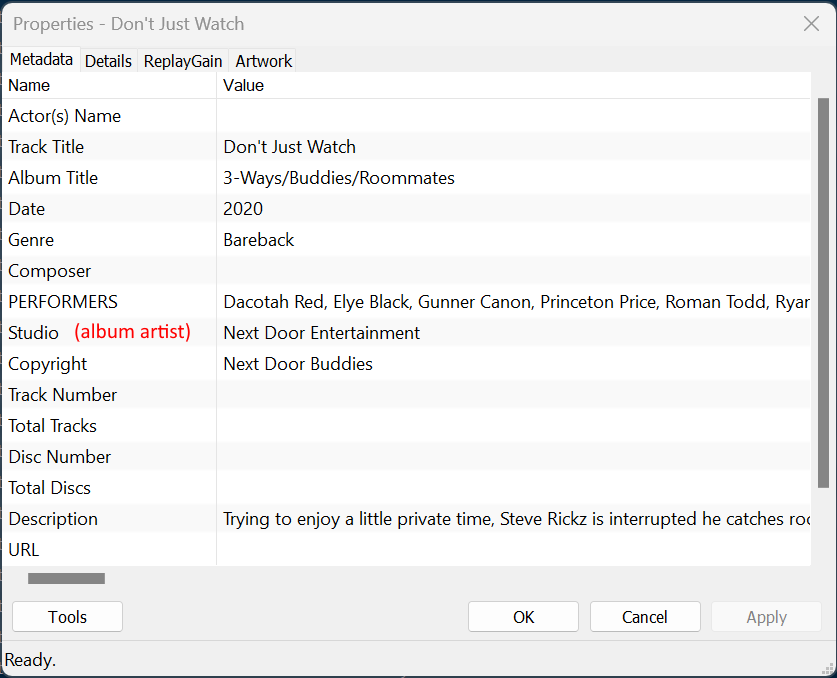
I sort my libray in the following ways and it has and continues to serve me and my Libraries well in the Plex-verse (after having changed my Library sorting several times pre and post-Plex adoption. The only very minor hiccup Plex has with this storage technique is that if you only have one video in a studio folder, Plex/PGMA sometimes needs a manual match. After a 2nd title has been added to the studio folder, there are no more issues and automatically matching titles is seamless. File Locations Drive: (network location)\Adult Scenes\Studio Name I use Foobar2000 to with added metadata for the above parameters and then use Foobar2000 to place the videos in the appropriate location. I also take advantage of Plex's native metadata support and use the "copyright" (@copyright) field to standardize the "Plex Studio" name across GEVI, IAFD. etc. For example Next Door Studios (GEVI) Next Door Entertainment (IAFD) and/or to distinguish Next Door Raw, Ebony, Buddies and so forth. Foobar2000 allows me to manage my collection, make changes to many files at one time and not have to manually maneuver around the drive/folder(s) contents and make changes to many smaller files or move from folder to folder looking for the files which need to be tweaked. Using Foobar2000 is easy to not only manage and tag your videos in your collection(s), it also requires ZERO programming ability to achieve quick and consistent 'work' out of managing and building your collection in Plex. HMU via DM if you have any questions. John |
Beta Was this translation helpful? Give feedback.
-
|
I can write a quick script that can move you video files firstly into a
studio folder and then within it into a film folder yet still retain the
the (studio) - film title (year) format which is essential for matching...
This is currently how I store all titles from the large studios exactly if
they have extra scenes etc... otherwise they just get dumped into a studio
folder...
The plex recommendation is that each film file be in its own individual
folder...
…On Sat, 9 Jul 2022, 03:24 jfreiman, ***@***.***> wrote:
Hello guys!
After several researches on the best way to organize the movie/video files
so that they can be read by Plex, I came to the conclusion that the proper
organization would be to have each movie/video in its own folder and not
all of them in a single folder. You can even have a poster or a fanart
inside that folder that it is linked to the movie/video in question and
pulled by Plex.
In order to facilitate organization and future research, I wanted to
create within the master video folder a folder for each studio and then,
within each of these, a folder for each film/video in question.
Considering the name format of the movie/video file established to obtain
the information from the agents: (studio) - movie name (year), is there any
way, having the files already with this name format, to automatically
create the studio folders and respective film/video folders, moving the
files automatically into the latter? Example: having in the master video
folder the files (Titan Media) - Hellions (2011).mkv and (Titan Media) -
Jury Duty (2011).mkv, create automatically a folder with the name "Titan
Media", and inside this the folders "Hellions (2011)" and "Jury Duty
(2011)", moving each the movies files into the respective folder.
Would certainly make life easier... A lot of time is wasted and it is
exhausted to have to create all the folders and then move the files into
them.
I don't have knowledge or programming skills, but isn't there some
instruction, code or a file that can be run allowing to perform these
repetitive tasks?
Regards
I sort my libray in the following ways and it has and continues to serve
me and my Libraries well in the Plex-verse (after having changed my Library
sorting several times pre and post-Plex adoption.
The only very minor hiccup Plex has with this storage technique is that if
you only have one video in a studio folder, Plex/PGMA sometimes needs a
manual match. After a 2nd title has been added to the studio folder, there
are no more issues and automatically matching titles is seemless.
*File Locations*
Drive: (network location)**Adult Features**\Studio Name
(studio name) - title - (year) [disk#] [UHD].mp4
Foobar2000 \%Album Artist%\['('%album artist%')'] - %title%
['('%date%')'] [Disk %discnumber%] ['['%UHD%']']
Drive: (network location)**Adult Scenes**\Studio Name
(studio name) - title - (year) [disk#] [UHD].mp4
\%Album Artist%\['('%album artist%')'] - %title% ['('%date%')'] [Disk
%discnumber%] [Scene %track%] ['['%UHD%']']
I use Foobar2000 to with added metadata for the above parameters and then
use Foobar2000 to place the videos in the appropriate location. I also take
advantage of Plex's native metadata support and use the "copyright" (
@copyright <https://github.com/copyright>) field to standardize the "Plex
Studio" name across GEVI, IAFD. etc.
For example Next Door Studios (GEVI) Next Door Entertainment (IAFD) and/or
to distinguish Next Door Raw, Ebony, Buddies and so forth.
Foobar2000 allows me to manage my collection, make changes to many files
at one time and not have to manually maneuver around the drive/folder(s)
contents and make changes to many smaller files or move from folder to
folder looking for the files which need to be tweaked.
HMU via DM if you have any questions.
John
—
Reply to this email directly, view it on GitHub
<#170 (comment)>,
or unsubscribe
<https://github.com/notifications/unsubscribe-auth/AKI3AKJUMMYKE2WE3TKCZMDVTDPFRANCNFSM5W5UMZBQ>
.
You are receiving this because you were mentioned.Message ID:
***@***.***
.com>
|
Beta Was this translation helpful? Give feedback.

-
|
Yeah, I know plex recommends a separate folder for each movie, but honestly, I don't think that would be beneficial and could be a pain to manage. :) Plus, once the movies and scenes are moved to sub-sub-folders Plex would have to re-match the titles and I would certainly encounter DDNS issues for a couple of weeks if not more. I like how Plex tracks the viewing of content for each item and if that was lost or started over that would be a big inconvenience for myself and the people I share my collections with. That said, I think using a tool like Foobar2000 gives much more control over where the files end up. It would be a simple edit in Foobar2000 to move the files wherever I wanted based not only on the Distributor name but also the "@copyright" field which I use to distinguish the different Studios -- which PGMA wouldn't recognize from the filename. But thank you for offering! |
Beta Was this translation helpful? Give feedback.
-
|
Before Plex, I have a tree of folders for my video collections, and became so deep and expansive that it began being more work than the collecting and ripping... ;) |
Beta Was this translation helpful? Give feedback.
-
|
Please point me to the foobar tool.....
I would like to look at it a bit more....
The script, I wrote can be used on your downloads folder... Once you have
renamed the downloaded files accordingly run the script and it will place
the files in folder/sub folder... which can then be moved to their final
locations - then plex can do its thing...
I understand that for older files this will cause an issue.....
You may have to look at the plex database - and edit the file locations
within that leaving all the other data untouched and see if that works.
Just make sure you take a copy of the database file.
I will edit the script I sent previously to move each film file into its
own folder folder....
So video file (Studio) - Film Title (Year).mp4 will go into a folder
C;\......\*Studio*\*Film Title (Year)*\(Studio) - Film Title (Year).mp4
or if you prefer it can be
C;\......\*Studio*\*(Studio) - Film Title (Year)*\(Studio) - Film Title
(Year).mp4
Give me an hour or so....
…On Sat, 9 Jul 2022 at 09:50, jfreiman ***@***.***> wrote:
Yeah, I know plex recommends a separate folder for each movie, but
honestly, I don't think that would be beneficial and could be a pain to
manage. :)
Plus, once the movies and scenes are moved to sub-sub-folders Plex would
have to re-match the titles and I would certainly encounter DDNS issues for
a couple of weeks if not more.
I like how Plex tracks the viewing of content for each item and if that
was lost or started over that would be a big inconvenience for myself and
the people I share my collections with.
That said, I think using a tool like Foobar2000 gives much more control
over where the files end up. It would be a simple edit in Foobar2000 to
move the files wherever I wanted based not only on the Distributor name but
also the ***@***.*** <https://github.com/copyright>" field which I use to
distinguish the different Studios -- which PGMA wouldn't recognize from the
filename.
But thank you for offering!
—
Reply to this email directly, view it on GitHub
<#170 (reply in thread)>,
or unsubscribe
<https://github.com/notifications/unsubscribe-auth/AKI3AKJKHQGAZVHKVG5KZUTVTE4L7ANCNFSM5W5UMZBQ>
.
You are receiving this because you were mentioned.Message ID:
***@***.***
.com>
|
Beta Was this translation helpful? Give feedback.
-
|
Foobar2000 is really an MP3/Music app, but it's quick versatile and supports reading and writing metadata to MP4 files. When you mentioned before about the "extra scenes" I either don't have many features with extra scenes or I have dealt with adding them to Plex a little differently. I do see how a separate dedicated movie folder could be beneficial in that respect. I'm definitely not in any hurry to move 10,6xxx feature movies to new folders and that's not even counting the individual scenes I have collected! 😪Plus I could easily move them with Foobar2000 without having to rely on a "bunch of scripts" to move files to different locations. Having them all organized using Foobar2000 is working fine and is flexible enough to make it do whatever I needed it to do or I believe I will need it to going forward. 🤞
|
Beta Was this translation helpful? Give feedback.

-
|
Colossal time savers, countless hours have been saved, easy-to-use products to help manage files and get them named correctly, and also automatically add Tags that were missing. Fast as well. And I have tried many others along the way. |
Beta Was this translation helpful? Give feedback.


Uh oh!
There was an error while loading. Please reload this page.
-
Hello guys!
After several researches on the best way to organize the movie/video files so that they can be read by Plex, I came to the conclusion that the proper organization would be to have each movie/video in its own folder and not all of them in a single folder. You can even have a poster or a fanart inside that folder that it is linked to the movie/video in question, and pulled by Plex.
In order to facilitate organization and future research, I wanted to create within the master video folder a folder for each studio and then, within each of these, a folder for each film/video in question.
Considering the name format of the movie/video file established to obtain the information from the agents: (studio) - moviename (year), is there any way, having the files already with this name format, to automatically create the studio folders and respective film/video folders, moving the files automatically into the latter? Example: having in the master video folder the files (Titan Media) - Hellions (2011).mkv and (Titan Media) - Jury Duty (2011).mkv, create automatically a folder with the name "Titan Media", and inside this the folders "Hellions (2011)" and "Jury Duty (2011)", moving each the movies files into the respective folder.
Would certainly make life easier... A lot of time is wasted and it is exhausted to have to create all the folders and then move the files into them.
I don't have knowledge or programming skills, but isn't there some instruction, code or a file that can be run allowing to perform these repetitive tasks?
Regards
Beta Was this translation helpful? Give feedback.
All reactions