How you guys organize multiple scenes from the same movie? #108

Replies: 7 comments 1 reply

-
|
Welcome! We're excited that you can join us. Great news! The functionality you're looking for comes out of the box from Plex, and therefore our agents support it. Here's how it works: let's say you have individual parts that make up the new Raging Stallion release Get a Room Too https://www.gayeroticvideoindex.com/V/5/67325.html if you properly name your files: (Raging Stallion Studios) - Get a Room Too (2021) Scene 1.mp4 and then match using our GEVI agent, Plex will group all four entries into one movie, with one poster. When you click on "Get Info" for that "movie", it will display the individual parts that were grouped to form that movie. A couple things to note:
Hope this helps. Cheers! Dakota |
Beta Was this translation helpful? Give feedback.

-
|
Good to hear that Plex support multiple parts video! I tried renaming to let Plex auto-merge parts into a movie and it's working but I can't find anywhere to select specific part to watch. Also going this way mean I'm losing the ability to track which scene has who staring Anyway thanks for the great tool. You're awesome! I hope I can contribute someday. |
Beta Was this translation helpful? Give feedback.
-
|
Hi again @hiddenpants255 After thinking about your question yesterday, I decided to add a section to our Guide. Please see below. To answer your questions:
There is an alternative way to approach this that may or may not work better for you. It will preserve the ability to play each scene separately, yet combine them in plex under one poster. I'll work on documenting this next. |
Beta Was this translation helpful? Give feedback.
-
|
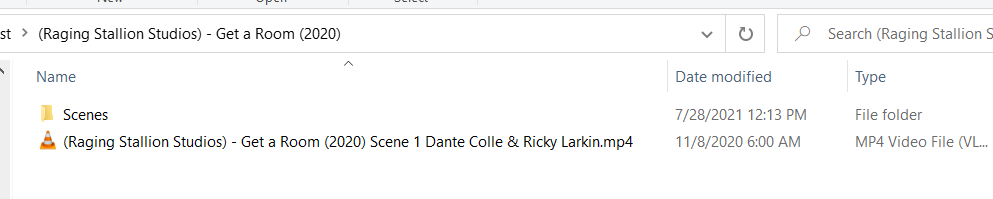
@hiddenpants255 Step 1. Create a Parent folder for the movie. I used the file naming convention of (Raging Stallion Studios) - Get a Room (2020)
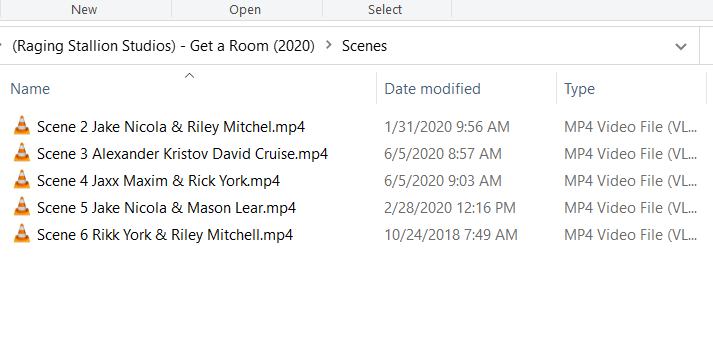
Step 4. In the Scenes folder, put the other 5 scenes named however you want to name them.
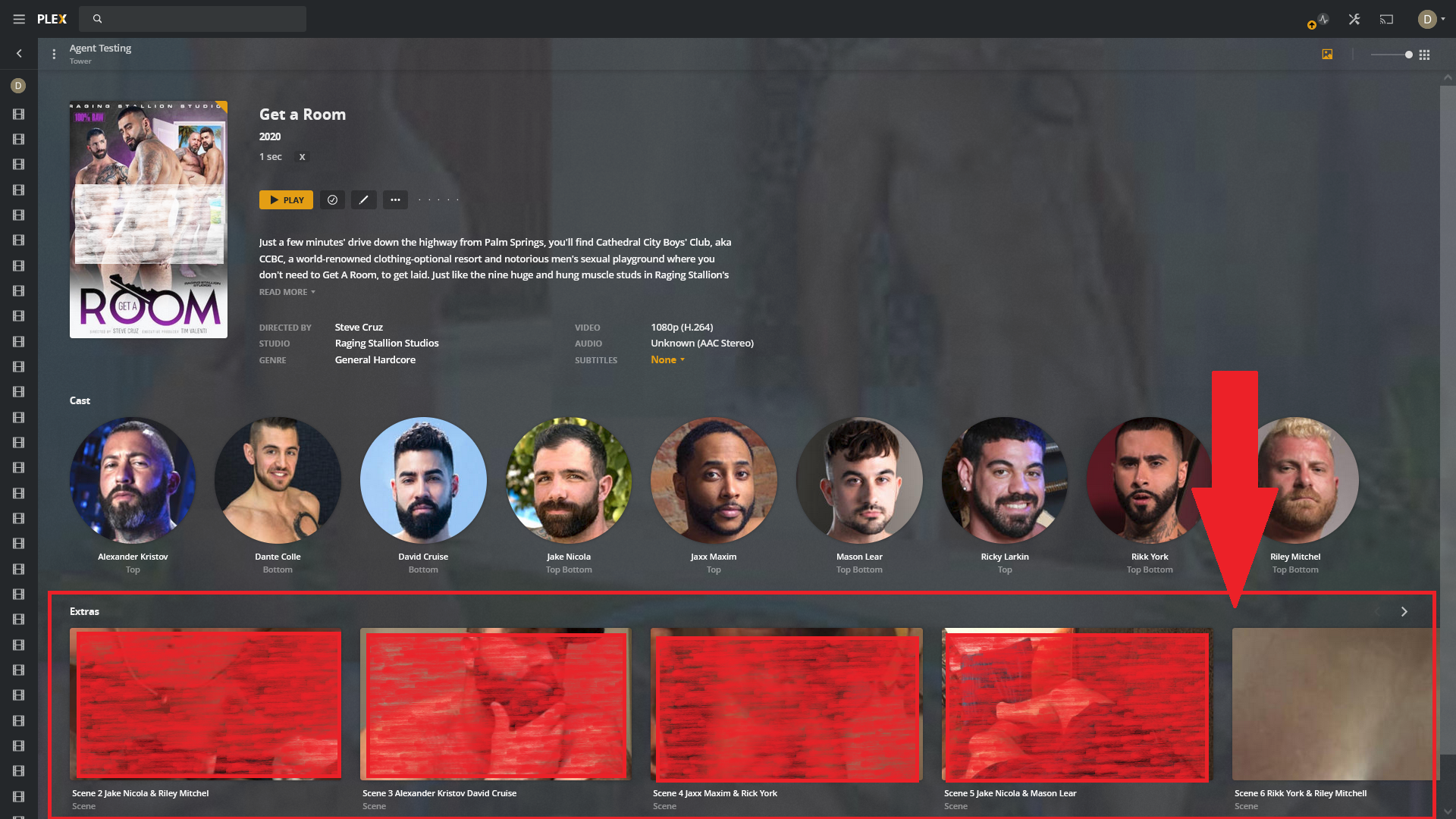
Once plex matches, it will return one media item with one poster. When you click on the poster, you will get the full description from the GEVI site for this movie. Scene 1 will play if you click on the poster. Unlike in the earlier example Plex doesn't "stack" the scenes into one "film" and treats them individually, so you will now also have scenes 2 - 6 displayed individually below.
Hope this helps. |
Beta Was this translation helpful? Give feedback.
-
|
Here is the update that will be made to the usage guide that incorporates both methods, if it helps. I encourage feedback. |
Beta Was this translation helpful? Give feedback.
-
|
The second approach looks very promising. This way I can keep the actors in the filename and still make sense when browsing without Plex. |
Beta Was this translation helpful? Give feedback.

-
|
Apart from using the word *Scene* Plex also recognises the following: cd,
disc, disk, dvd, part and *pt* to create stacked movies
Could you also add this to the pdf?
Brilliant find on showing the scenes as Extras!!!!!! I am so going to start
using that!
Jason
…On Wed, 28 Jul 2021 at 19:12, hiddenpants255 ***@***.***> wrote:
The second approach looks very promising. This way I can keep the actors
in the filename and still make sense when browsing without Plex.
—
You are receiving this because you are subscribed to this thread.
Reply to this email directly, view it on GitHub
<#108 (comment)>,
or unsubscribe
<https://github.com/notifications/unsubscribe-auth/AKI3AKO4ASKCVOFKRSQLKS3T2BCAHANCNFSM5BCZCHTA>
.
|
Beta Was this translation helpful? Give feedback.

-
|
Guide has been updated. |
Beta Was this translation helpful? Give feedback.


Uh oh!
There was an error while loading. Please reload this page.
-
Hi everyone!
I just found out this repo and so exciting to start organizing my library! I have a lots of scenes that comes from the same movie and curious on how should I organize them in Plex and which agent should I use?
Scene from blogging site seems to have unnecessary long title and doesn't looks nice when viewing lots of them at the same time. I prefer to have them groups in the same movie cover. Is that something I can do in Plex?
Beta Was this translation helpful? Give feedback.
All reactions